
Introduction:
In this writeup, we will start from the beginning of pwning OWASP Juice Shop to a comprehensive walkthrough. Let’s don’t talk too much and get started! Here’s the OWASP Juice Shop official document: OWASP Juice Shop. This article includes all one star challenges!
Installation(Docker)
There’re multiple ways to install juice shop on your machine. I choose docker because it’s already installed on my machine. Furthermore, docker is isolated in the environment so it won’t affect the existing programs or services.
- Download the latest docker image
docker pull bkimminich/juice-shop - Launch the container
docker run -d -p 127.0.0.1:3000:3000 bkimminich/juice-shop - Quick Test
curl -I http://localhost:3000
Score Board
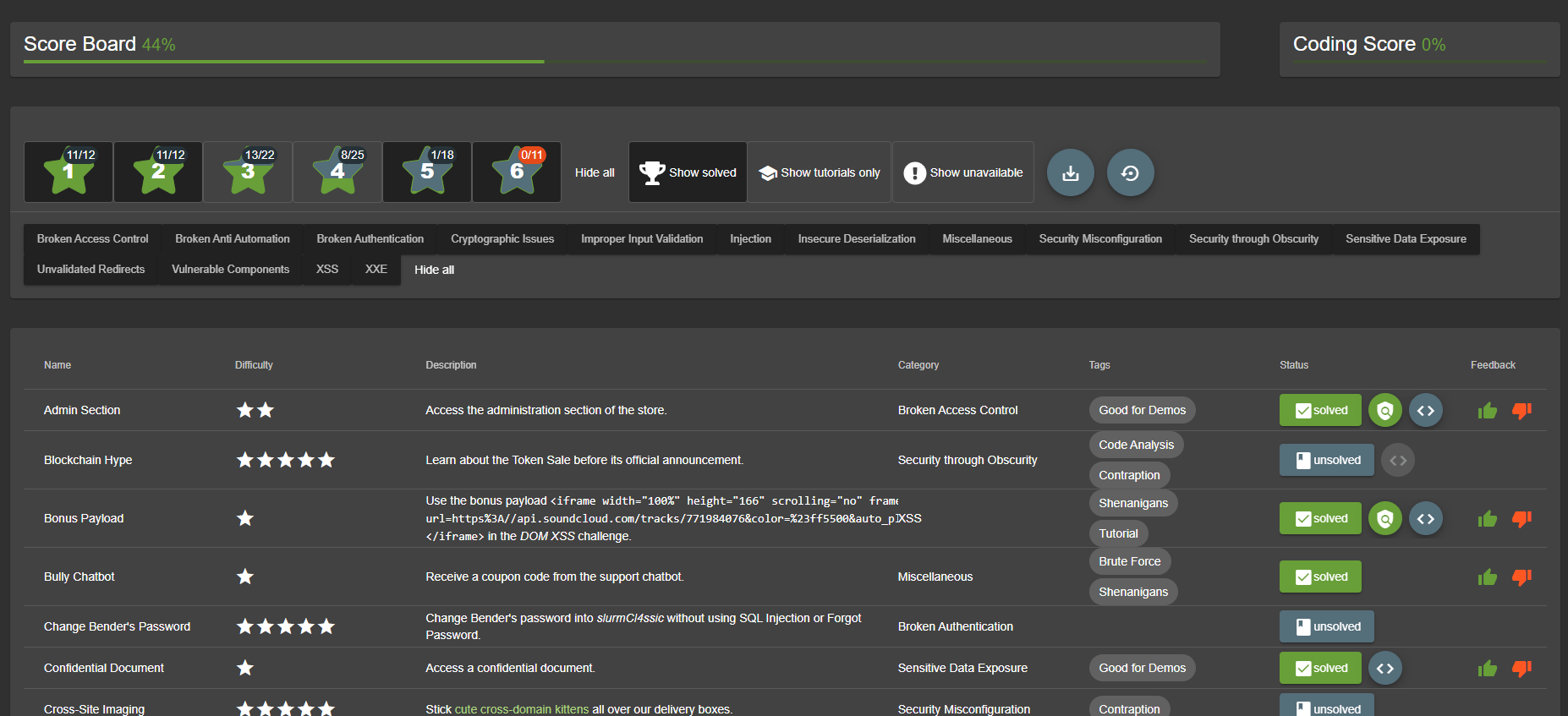
There’s a scoreboard provided by Juice Shop which is hidden in the URL. We can access it through adding score-board to the URL and find out how many vaulnerabilities are there in this vulerable website. It also provides learners a decent way to record how many vulnerabilities are left in the website. The challenges are rated with a difficulty level between 1-star to 6-star. We will likely to complete it from the easist to the most difficult ones.
Outline
| Challenge | Vulnerability |
|---|---|
| 1.1 DOM XSS | DOM XSS |
| 1.2 Bonus Payload | DOM XSS |
| 1.3 Privacy Policy | Misc. |
| 1.4 Bully Chatbot | Misc. |
| 1.5 Confidential Document | Sensitive Data Exposure |
| 1.6 Error Handling | Security Misconfiguration |
| 1.7 Exposed Metrics | Observability Failures |
| 1.8 Mass Dispel | Misc. |
| 1.9 Missing Encoding | Improper Input Validation |
| 1.10 Outdated Allowlist | Unvalidated Redirects |
| 1.11 Repetitive Registration | Improper Input Validation |
| 1.12 Web3 Sandbox | Broken Access Control |
| 1.13 Zero Stars | Improper Input Validation |
1 Star Challenge
1.1 DOM XSS
Perform a DOM XSS attack with <iframe src="javascript:alert(`xss`)">
After I browse the website for a while, I found there’s a direct way to insert this DOM XSS that is the search box. For this vulnerability, just directly type <iframe src="javascript:alert('xss')"> in the searchbox.
-
Root Cause The searchbox logic contains DOM sink (A sink is a potentially dangerous JavaScript function or DOM object that can cause undesirable effects if attacker-controlled data is passed to it. - portswigger) while Javascript takes data from an attacker-controllable source (in this case the input from searchbox) and passes it to a sink that supports dynamic code execution (e.g.
eval(),innerHTML). -
Remediation The advice is to avoid allowing data from any untrusted source to dynamically alter the value that is transmitted to any sink. If you still want to include sinks, you should process the input before transmitting to them. For example, you could do Javascript encoding/URL encoding during processing URL.
1.2 Bonus Payload
Use the bonus payload <iframe width="100%" height="166" scrolling="no" frameborder="no" allow="autoplay" src="https://w.soundcloud.com/player/?url=https%3A//api.soundcloud.com/tracks/771984076&color=%23ff5500&auto_play=true&hide_related=false&show_comments=true&show_user=true&show_reposts=false&show_teaser=true"></iframe> in the DOM XSS challenge.
We could take a closer look at this payload. It’s supposed to be a video/audio recording due to allow="autoplay" iframe attribute.
-
Root Cause Same as 1.1 Root Cause. The searchbox logic contains DOM sink (A sink is a potentially dangerous JavaScript function or DOM object that can cause undesirable effects if attacker-controlled data is passed to it. - portswigger) while Javascript takes data from an attacker-controllable source (in this case the input from searchbox) and passes it to a sink that supports dynamic code execution (e.g.
eval(),innerHTML). -
Remediation The advice is to avoid allowing data from any untrusted source to dynamically alter the value that is transmitted to any sink. If you still want to include sinks, you should process the input before transmitting to them. For example, you could do Javascript encoding/URL encoding during processing URL.
1.3 Privacy Policy
Read our privacy policy.
Just Register an account and read privacy policy.
1.4 Bully Chatbot
Receive a coupon code from the support chatbot.
Just simply communicate with chatbot and try to bypass it. There’re at least two responses from the chatbot to get the coupon. The first response is “You should check out our social media channel for monthly coupon…” and we could get the coupon from Juice Shop Reddit which we could find on About Me page. The second would be “Oooookay, if you promise to stop nagging me here’s a 10% coupon code for you: XXXXXXX”.
1.5 Confidential Document
Access a confidential document
The entry-point of this vulnerability is About me page. There’s a link which directs me to http://localhost:3000/ftp/legal.md. Now, we should wonder what files are under ftp/ directory as long as we know that FTP is a file management service for managing files. After accessing ftp/ we found that there’re several files and one folder named quarantine. Just simply viewing some files.
-
Root Cause Sensitive documents were stored in a publicly accessible ftp directory without proper access control. (It’s still unsafe to just ban users viewing files in some specific formats:
Only .md and .pdf files are allowed!) -
Remediation Remove confidential files from publicly accessible directories and enforce proper authentication(e.g. additional layer of login) for document access.
1.6 Error Handling
Provoke an error that is neither very gracefully nor consistently handled.
If we try out the way on previous steps viewing files under ftp/ directory, we may provoke a 403 Error with an error message: “Only .md and .pdf files are allowed!”.
-
Root Cause The website returns verbose error responses to users (in this case
403 Error: Only .md and .pdf files are allowed!, the version of Express, and detailed stacktrace), exposing internal implementation details such as stack traces and SQL-related error information.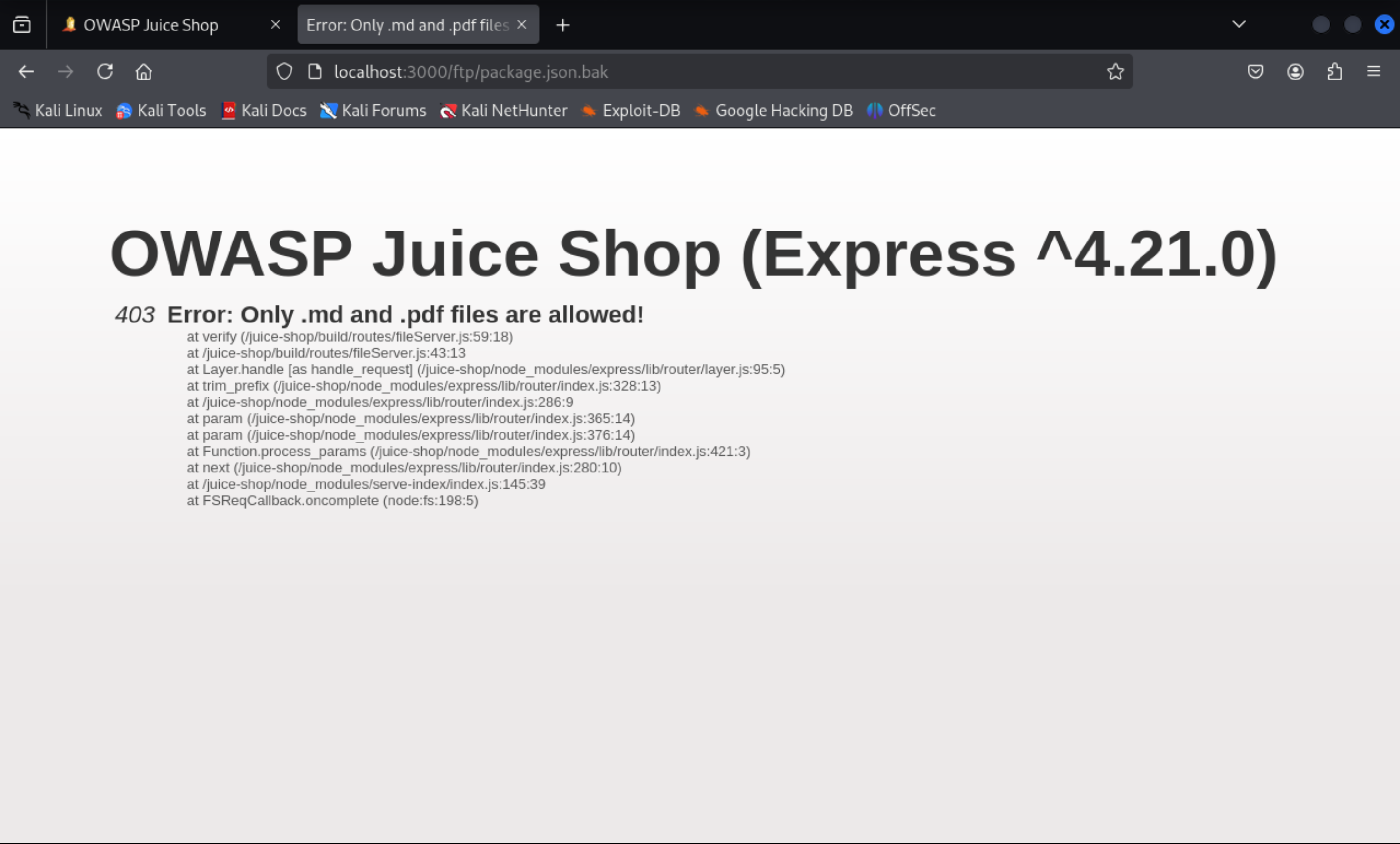
-
Remediation The most effective way is to replace verbose errors with generic messages (e.g. all errors look the same) and disable stacktrace details in production. Revealing debug messages is unnecessary.
1.7 Exposed Metrics
Find the endpoint that serves usage data to be scraped by a popular monitoring system.
p.s popular monitoring system: prometheus
Prometheus is a systems and monitoring system. This type of project requires configuration settings including paths. We can search for default endpoints/paths for serving usage data. We found that ./data for data storage and /metrics for HTTP metric endpoint. Try /metrics.
-
Root Cause The website exposed its Prometheus metrics endpoint (
/metrics) to unauthenticated users, making internal usage and technical monitoring data publicly accessible. -
Remediation Restrict access to the metrics endpoint (for example, require authentication or limit access to trusted IPs only), and avoid leaving default monitoring endpoints publicly reachable on public deployments.
1.8 Mass Dispel
Close multiple "Challenge solved"-notifications in one go.
On the official document, it says - you can simply Shift-click one of their X-buttons to dismiss all at the same time.
1.9 Missing Encoding
Retrieve the photo of Bjoern's cat in "melee combat-mode".
Speak to photo, we found there’s a Photo Wall on the side navigation bar. As we viewed the Photo Wall page, we observed that the first image is invalid due to its src attribute. It contains some invalid characters so that the interpreter can not recognize the URL. We could URLEncode it and replace it afterwards %E1%93%9A%E1%98%8F%E1%97%A2-%23zatschi-%23whoneedsfourlegs-1572600969477.jpg. Note that the prefix cannot be modified assets/public/images/uploads/. Otherwise the scoreboard can’t detect the success. (However, it still work)
-
Root Cause The image includes invalid characters (unsafe ASCII characters & control characters) without proper URL encoding. In this case, the image uses
#so the browser interpreted part of the path incorrectly. (#without encoding will be considered as fragment delimiter). -
Remediation Properly URL encoding file paths. In addition, restrict uploaded filenames to a safe character set so that reserved URL characters do not appear unencoded in public asset URLs.
1.10 Outdated Allowlist
Let us redirect you to one of our crypto currency addresses which are not promoted any longer.
Most of these code will be written in JS file. We simply do a check on all JS files. Searching keyword “redirect” which seems to appear in the redirect URL and found that there’re three JS files containing redirect keyword: main.js, 989.js and vendor.js. After a quick glimpse, only main.js contains some suspicious and valid URL which formats like url='./redirect?to=xxx'. We simply try all of them(3) and found the one contains https://blockchain.com is the correct one.
-
Root Cause Deprecated code still remains in client-side functions. In this case, outdated function still exists in
main.js. -
Remediation Remove deprecated URLs from the redirect logic and from any client-side code that still references them, and validate
toparameter only against a current approved allowlist. In this way, there’s no entrypoint and most attacks will be prevented.
1.11 Repetitive registration
Follow the DRY principle while registering a user.
The description leads us to the Registration page. We got an email input, a password and repeat password input, as well as a security question and corresponding answer. As a vulnerability, we need to break the validation rule which is obvious the password and its confirmation input. My solution is to make sure the Register button isn’t disabled when you don’t repeat your password intentionally. In disabled button, we need to remove mat-mdc-button-disabled class and disabled="true" attribute. By doing this, the Register button would become available.
There’s also an easier way to achieve this challenge. Just use burp suite, catch the request and modify the repeat password (repeatPassword) value, finally send the request.
-
Root Cause The registration flow used incomplete cross-field validation: the
passwordRepeatcheck was not revalidated when the original password changed, and the backend failed to enforce that both password fields matched before creating the account. -
Remediation Revalidate the password confirmation whenever either password field changes, and enforce a mandatory server-side check that rejects registration unless
passwordandpasswordRepeatare identical. Client-side validation may improve usability, but the server must remain the main validation layer. (Because most validation on the front-end side can be bypassed)
1.12 Web3 Sandbox
Find an accidentally deployed code sandbox for writing smart contracts on the fly.
We searched Web3 Sandbox default path in Google and found that the path is generally /web3-sandbox.
-
Root Cause A developer-only sandbox
/web3-sandboxwas accessible in the production frontend. The path is still visible inmain.jsso anyone inspecting the code could discover and access it. -
Remediation Remove non-production or developer-only routes from production builds, or gate them behind feature flags that are disabled in production. If the feature must exist, it should enforce server-side authorization.
1.13 Zero Stars
Give a devastating zero-star feedback to the store.
Same as challenge 1.11 Repetitive Registration. Use burp suite to catch the request and modify the rating value.
-
Root Cause The feedback form relied on client-side UI controls (a disabled submit button) to enforce rating selection, but the server failed to validate that the submitted rating was present and within the allowed range. This allowed a zero-star feedback submission by bypassing the frontend restriction.
-
Remediation Enforce server-side validation that requires a valid rating before saving feedback, and reject any value outside the allowed range.
Materials
- OWASP Juice Shop Official Document
- DOM-based vulerabilities - PortSwigger
- DOM-based XSS - PortSwigger